Tune it. Test it. Prove it.
PC optimization software for gamers. Tune your system for FPS and latency, stress test your hardware and verify benchmark results publicly. Free for 48 hours.
Game Mode works with detected and added games · CS2 tools are CS2-only







Click around the app.
Open any tab in the tools panel, including the Stress Test Center. Readings are sample values.
The preview shows the TinyBoost dashboard: system info and the one-click optimize button on the left, and tools for PC Health, Windows, CPU, GPU, CS2 and Network on the right.
Every tool you’d install separately, in one app.
Stress Test Center
CPU, GPU, combined and power supply stress tests in one place, with live HWiNFO telemetry and WHEA error monitoring. CPU presets cover per-core, cache, memory controller and RAM. GPU tests run steady, transient or ramp loads and check for rendering artifacts. Try it here.
On screen display
See temps, clocks, FPS and system load in game, without alt-tabbing.
NVIDIA V/F curve editor
Shape your NVIDIA card's voltage and frequency curve by hand, with every point on one screen and a live readout as you drag.
Automatic NVIDIA GPU undervolting
Finds a cooler, quieter operating point for your NVIDIA card, then proves it holds before it keeps it.
NVIDIA and AMD clean driver updater
Checks for the latest NVIDIA or AMD driver and clean installs it, with only the parts you pick and no extra bloat.
Process manager
Pick what gets closed and what gets frozen while you play.
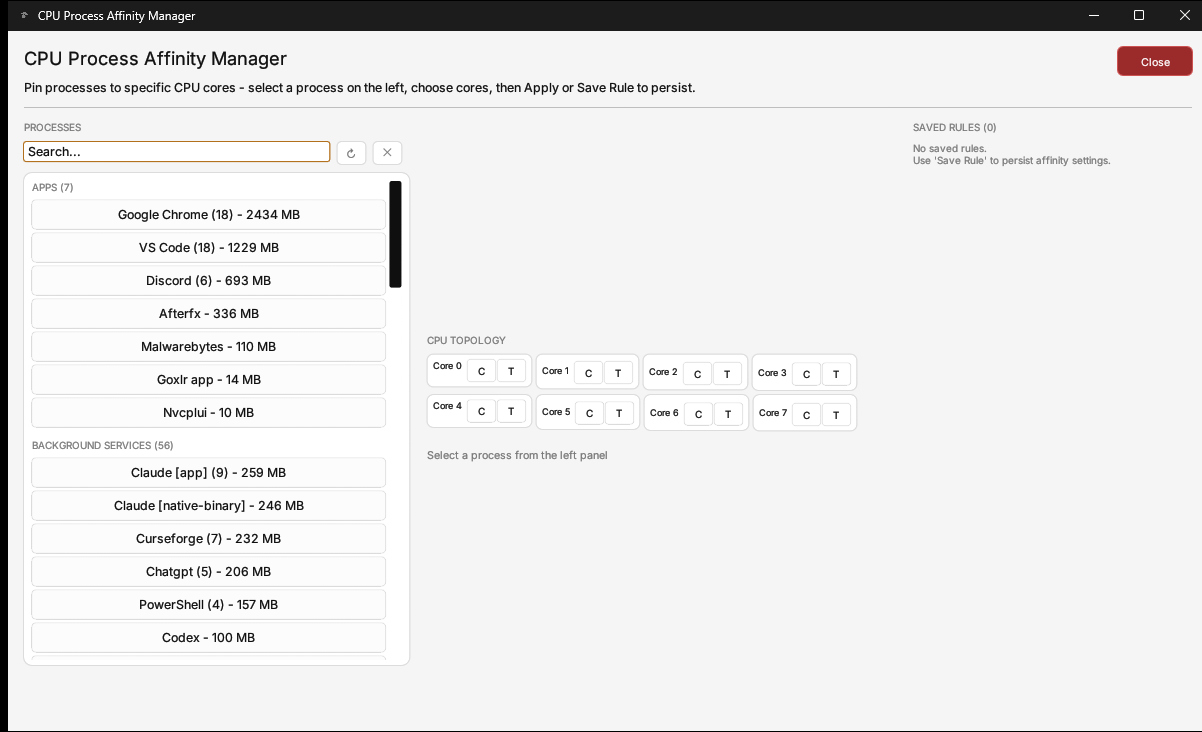
Hybrid-aware affinity
Move apps onto the cores you choose, like Process Lasso but built in. Perfect for hybrid CPUs.
Memory timings calculator
Calculate practical DDR5 and DDR4 timing targets for AMD and Intel platforms, all in one place. Even the most aggressive presets are lenient, leaving headroom for stability.
Windows, your way
Privacy, taskbar, shell and gaming settings in one place. No registry digging.
Bad tweaks repair
Scans your PC for misconfigured Windows tweaks and fixes the ones it finds.
Windows Update control
Defer feature updates, keep only security patches, or shut Windows Update off entirely. Your call, not Microsoft's.
Capture Center
Record frame times and sensor readings with PresentMon while you play. See average FPS, 1% and 0.1% lows and stutters for every run, then compare captures side by side.
CS2 Server Plotter
Test the route to any CS2 server. See every hop between your PC and Valve with its ping, jitter and packet loss, so you know exactly where the delay builds up.
Bufferbloat test
See how much your ping climbs when your connection is busy. TinyBoost loads your line while it measures, then grades the lag spike you would feel in game.
Don't take our word for it. Verify it.
Every benchmark gets a unique ID that anyone can check on our public validator.No video settings or in-game resolution are changed on the automated tweaked benchmark.
Test PC: Ryzen 7 9800X3D and RTX 5070 Ti, used as a workstation. BEFORE is the PC as it was when TinyBoost started. Average of three TinyBoost passes against it: average FPS 764.8 to 810.3 (+6%), 1% low average 248.0 to 295.6 (+19%), 0.1% low average 181.0 to 214.2 (+18%). Captured with PresentMon 2.
Results vary by PC and other factors.
Your settings come back.
TinyBoost records supported game-session settings before changing them. Press STOP to restore the recorded session state. Separate tools have their own undo controls; closed apps are not reopened, and deleted files cannot be recovered.
Snapshot
Supported game-session settings are recorded before changes.

Game mode
Configure your game mode and start.
Restore
Press STOP to restore recorded session settings. Separate tools need their own undo controls.
One app. Pick how you pay.
Every plan gets the entire app on Windows 10 and 11. What changes is how you pay and the support you get, up to a private community and direct chat with the development team. Every plan needs an internet connection, sign-in and Windows administrator rights, and works on one PC at a time.
Cancel future renewal anytime.
Try everything free for 48 hours. Start free trial
Every plan includes the entire app. No cutting corners.
- One-click Game Mode
- TinyBoost Smart Optimization
- Custom Automated CS2 Benchmark, before and after
- Tweaked Automated CS2 Benchmark
- CS2 server region blocker
- Smart automatic GPU undervolt
- NVIDIA clean driver install
- NVIDIA V/F Curve Map
- RADEON GPU Clean Auto Updater
- CPU affinity and process rules
- Windows debloat, tweaks and services
- Network Tuning Suite
- Complete stress test suite
- CPU stress test
- RAM stress test
- Memory controller stress test
- GPU stress test with artifact detection
- GPU VRAM test
- Power supply test
- Future updates
- Future game support

Found a bug?
Here's a license.
TinyBoost is in open beta, so things won't always go to plan. If we identify and fix an issue you ran into, we'll reward you with a license.
TinyBoost questions, answered.
Looking for more? Read the detailed FAQ
What does TinyBoost do?
An all-in-one PC performance suite: one-click game optimization, a full stress test suite, an on-screen display, NVIDIA undervolting, a clean driver updater and more.
Will I get more FPS?
Results vary by PC. TinyBoost is an early software release, so we do not promise a number. See real runs on tinyboost.app/results, or try the free 48-hour trial to test it on your own PC.
Can TinyBoost damage my PC?
Stress tests and the V/F curve editor can push your hardware hard. TinyBoost monitors supported readings and stops tests when required safety readings are lost, but no software can guarantee that a PC will never crash or develop a hardware fault. If a test causes instability, stop tuning and check your hardware before retrying.
Is TinyBoost VAC safe and anti-cheat safe?
TinyBoost works from outside your games: it does not inject code into a game or read or change game memory. Anti-cheat makers do not certify third-party tools, so we cannot guarantee how an anti-cheat, league, or tournament will classify it. Check the rules for your game and report any warning to support.
How does the free trial work?
The trial gives 48 hours of full access with no card required. You sign in with Google or Discord to start it, and each device and each account can use the trial once.
Can I get a refund?
Yes. Your first purchase has a 7-day money-back guarantee: a full refund, no reason needed, no fees deducted. It applies once per customer. Request it within 7 days using Request a refund in your account, or email tinyboost@fpsheaven.com. Details are in the terms of service.
Try it free for 48 hours.
No card, no catch.
Download TinyBoost
Windows 10 & 11 · Game Mode works with detected and added games; CS2 tools are CS2-only
Buying later? Your first purchase has a 7-day money-back guarantee.
9c6e9a304e0e2ad55a664e3f367155f29e06f856fa3f7d9b0d02432783517f52VirusTotal scanKaspersky scan